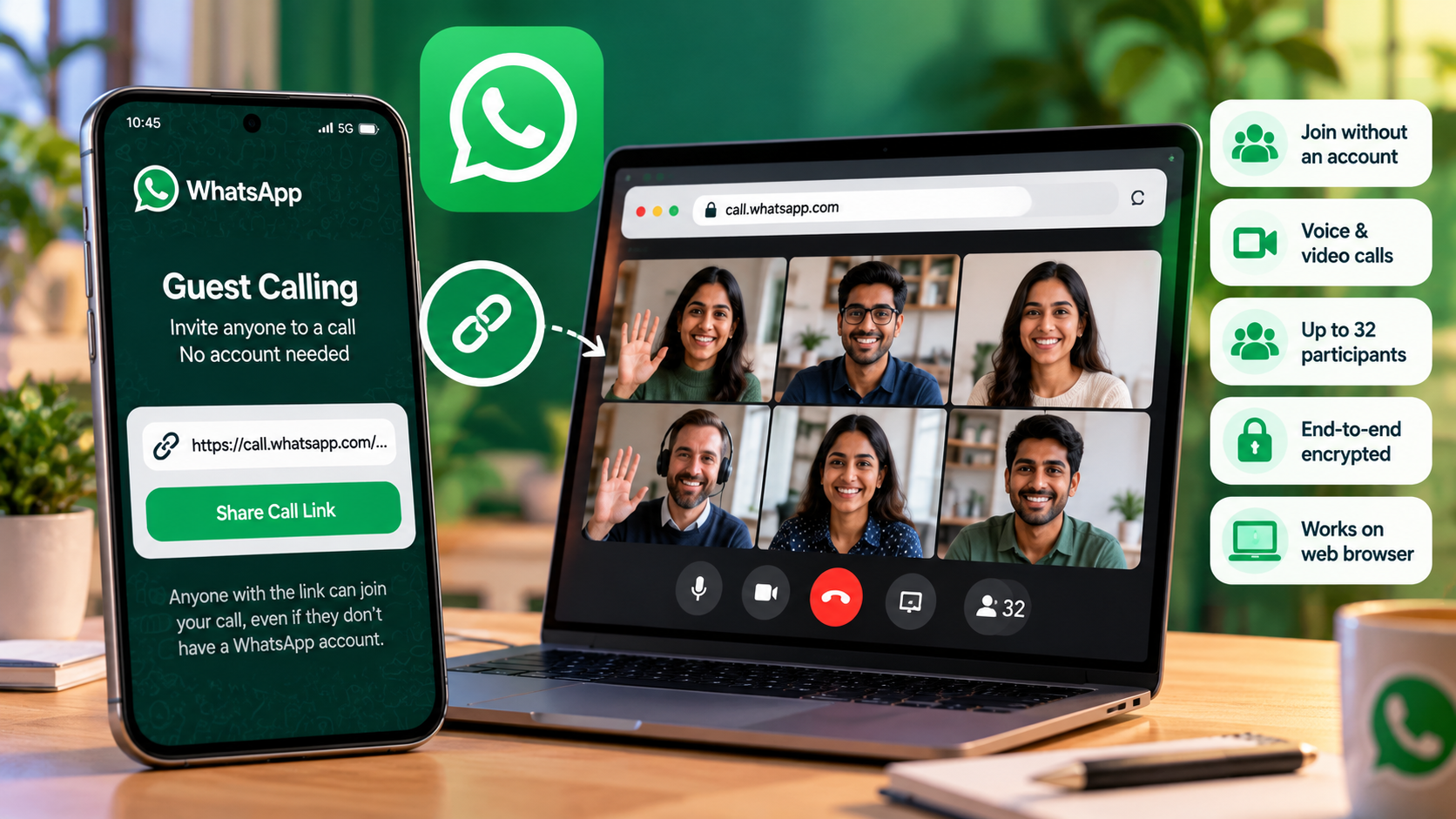
WhatsApp has introduced Guest Calling, a feature that allows people to join voice and video calls without creating a WhatsApp account or installing the app. Instead of asking every participant to register, the person hosting the call can share an invitation link with guests.
Announced on 14 October 2026, the feature is designed to make WhatsApp calls more accessible for work meetings, online classes, tutoring sessions and conversations with friends or family who do not use the messaging platform.
WhatsApp says guest calls are free, end-to-end encrypted and have no time limit. Group calls can accommodate up to 32 participants, while the host retains control over who is allowed to join.
What Is WhatsApp Guest Calling?
WhatsApp Guest Calling allows an existing WhatsApp user to invite someone without a WhatsApp account into a voice or video call using a shared link.
The invited person opens the link in a supported computer browser, enters a name and requests to join. The guest must wait until the host approves the request before entering the call.
The key difference is that the person creating the call still needs a WhatsApp account, but the invited guest does not need to register for the service.
According to WhatsApp's announcement, guest calling supports both one-to-one and group calls, with up to 32 participants in a group call.
How to Create a WhatsApp Guest Call
To invite someone who does not have a WhatsApp account, follow these steps:
- Open WhatsApp on your phone.
- Go to the Calls tab.
- Select the plus (+) icon.
- Choose the option to create a call link.
- Select the relevant call type if prompted.
- Copy or share the generated link with the person you want to invite.
- Wait for the guest to open the link and request access.
- Approve the guest when you are ready to let them enter the call.
Menu labels can vary with the app version. If the call-link option is not visible, update WhatsApp through the official app store and check again later.
How to Join a WhatsApp Call Without an Account
A person who does not have a WhatsApp account can join an invited guest call without creating an account or installing the WhatsApp app, using a supported computer browser.
- Receive a WhatsApp call invitation link from the host.
- Open the link on a computer in a supported browser.
- Enter your name when prompted.
- Request to join the call.
- Wait in the virtual waiting room until the host approves your request.
- Once admitted, use the available audio and video call controls.
Guests cannot create the call link themselves. They need an invitation from a WhatsApp account holder, and the host must approve their entry.
WhatsApp's announcement specifically describes joining through a computer browser. Users should check the latest official instructions before assuming the same guest-joining process works identically on every mobile browser or device.
Is WhatsApp Guest Calling Free?
WhatsApp says guest calls are free and have no time limit. Users do not need to pay a separate WhatsApp guest-calling fee to participate.
However, calls use an internet connection. Mobile data charges, broadband costs or other charges imposed by an internet provider may still apply.
WhatsApp has not announced a call-duration limit for this feature. This does not mean that every internet connection will remain uninterrupted; connectivity, device performance and other technical factors can still affect a call.
Does Guest Calling Support Video Calls?
Yes. WhatsApp Guest Calling supports voice and video calls. The feature also supports one-to-one conversations and group calls with up to 32 participants.
Guests can use several in-call features, including computer screen sharing, emoji reactions and the ability to raise a hand to request a turn to speak.
These options may be particularly useful for remote work, study groups, online tutoring and collaborative discussions where not every participant uses WhatsApp.
Is WhatsApp Guest Calling Secure?
WhatsApp says guest calls are protected by end-to-end encryption. The company also provides access controls so that guests cannot enter a call automatically just because they possess an invitation link.
Guest requests go into a waiting room until the host approves them. The host can also remove guests from the call.
WhatsApp says guests cannot see the phone numbers of other participants, send messages through the call or directly add more people to it.
These controls help limit access, but users should still be careful when sharing invitation links. Send links only to intended participants, approve only people you recognise and avoid sharing private information with unverified callers.
WhatsApp Guest Calling vs Regular WhatsApp Calls
| Feature | Guest Calling | Regular WhatsApp Call |
|---|---|---|
| WhatsApp account needed | Not required for invited guests | Required for participants using regular WhatsApp calling |
| Invitation method | Shared call link | Direct call or supported call invitation |
| Host approval | Required for guest entry | Depends on the normal call flow |
| Group-call capacity | Up to 32 participants | Depends on WhatsApp's applicable group-call limits |
| End-to-end encryption | Yes, according to WhatsApp | Yes, according to WhatsApp |
The main benefit of guest calling is that people can participate without creating an account. It does not eliminate the need for the host to use WhatsApp or manage access to the call.
WhatsApp Plans Google Calendar and Outlook Integration
WhatsApp has also announced plans to introduce integrations with Google Calendar and Microsoft Outlook later in 2026.
The proposed integration will let users create WhatsApp call links from their calendars by installing the relevant WhatsApp plugin, connecting their account and adding a call link to an invitation.
The calendar integration was described as a future rollout in the announcement dated 14 October 2026. It should not be treated as already available to every user.
Why WhatsApp Guest Calling Matters
Guest calling could make it easier for people to communicate across different apps and devices. For example, a tutor can invite a student who does not use WhatsApp, a small business can hold a conversation with an external participant, or a family member can invite someone who has not registered for the service.
The feature also gives users an alternative for occasional conversations where creating a new account would be inconvenient.
However, it is not a complete replacement for dedicated meeting platforms in every situation. Users should compare their requirements for meeting management, scheduling, participant controls, accessibility and collaboration before choosing a calling service.
What If WhatsApp Guest Calling Is Not Available?
If you cannot find the call-link option, update WhatsApp to the latest version available through the official app store. Then reopen the app and check the Calls tab.
New features can be enabled gradually, so their availability may differ between users. A missing option does not necessarily mean that the phone is incompatible.
Do not download unofficial applications or configuration files claiming to unlock guest calling. Use WhatsApp's official website and support resources for updates and troubleshooting.
Official WhatsApp Guest Calling Announcement
WhatsApp announced the feature on 14 October 2026. Read the company's announcement for the latest supported features and instructions:
WhatsApp: Now You Can Invite Anyone to a WhatsApp Call
Conclusion
WhatsApp Guest Calling allows invited people to join voice and video calls without creating an account or installing the app, using a supported computer browser. Calls are free, end-to-end encrypted and have no time limit, according to WhatsApp.
The host must create the invitation link and approve guests before they enter. With support for group calls of up to 32 participants, the feature could be useful for online classes, work discussions and personal conversations.
As the rollout continues, users should check the official WhatsApp announcement for availability and use only genuine invitation links from trusted hosts.